Receipt Printer Setup and Hardware Recommendations for Businesses
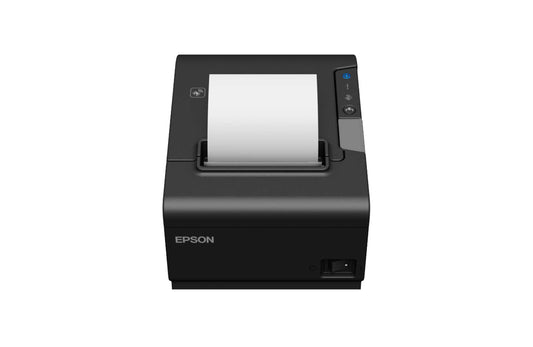
A receipt printer, or POS printer, is an essential part of every retail, restaurant and service business. A properly configured receipt printer means fast service, accurate receipts and satisfied customers. Below are the key recommendations for installing your printer correctly and choosing the right hardware.
1. Choosing the right connection type
Before buying a printer, think through how it will connect to your POS system.
The most common options:
- USB — simple, stable connection for desktop computers;
- LAN (Ethernet) — lets several tills share one printer;
- Wi-Fi or Bluetooth — ideal for mobile POS systems.
If you use an iPad or tablet, check that the printer supports iOS or Android compatibility.
2. Paper formats and cutter
Choose a printer that matches your paper roll width — usually 58 mm or 80 mm.
A quality auto-cutter saves time and reduces wear.
We recommend thermal paper, which delivers quiet, fast printing without ink.
3. Speed and reliability
In a service environment the printer must be fast and quiet.
A good benchmark is at least 200 mm/s print speed.
It also pays to favour trusted brands such as Epson, Citizen, Star Micronics or Birch, whose printers are known for long service life and low failure rates.
4. Software and drivers
Make sure the printer supports your POS software — for example iPOS, Loyverse, Erply or Vend.
Before first use:
- Download the correct drivers from the manufacturer's website;
- Check the printer's emulation (ESC/POS, ZPL, CPCL etc.);
- Run a self-test print to confirm the connection is correct.
5. Regular maintenance
Although receipt printers need little maintenance, it is worth periodically:
- Cleaning the print head with a dedicated cleaning wipe;
- Removing dust and paper debris;
- Checking the cutter's condition and updating drivers when needed.
Summary
A good receipt printer is more than a device that prints receipts — it is a central part of the customer experience and your workflow. The right model and a correct installation keep your system running smoothly and without interruptions.
Explore the Scanshop.ee range, featuring leading POS printer manufacturers and solutions for every business.
Tags:
Previous
What to Look for When Choosing a Receipt Printer
Next
Mobile Terminals: A Smart Solution for Efficient Field Work